Windows & Mac Android & iPhone apps

Billing & inventory for Indian shops

Layerdots is billing, inventory and GST software built for Indian shops across retail and wholesale/distribution. Bill in seconds, track every batch, and scan supplier invoices with AI. Works on your Windows PC or your Mac, with a phone app to run your shop from your phone too.

7-day free trial · No online account · No card required
Layerdots ERP dashboard showing today's sales, dues and recent bills
Made for
Pharmacy Retail Wholesale & Distribution Composition dealers
7-Day
Free trial, full features
Local-First
Your data stays on your PC
GST-Ready
Reports, returns & registers
Made in India
Cloud Sync data stays in Mumbai

GST billing software that runs the whole counter

From taking stock in to handing over the final bill. It adapts to how you work, whether you run a pharmacy, a retail counter, or a wholesale and distribution business.

Fast Billing & POS

Keyboard-driven billing with barcode scan-to-bill. Search, auto-fill price and batch, discount, and print GST invoices in seconds. Pick a simple B2C bill or a detailed B2B distributor invoice. Send an estimate first and convert it to an invoice in one click. Modify, return or cancel a bill, and stock and dues adjust on their own.

Cash · Card · UPI · CreditEstimates & quotationsExpiry alerts

Scan & Pay UPI on Every Bill

Print a UPI QR right on the invoice with that bill's exact amount and number already filled in. The customer scans, checks the figure and pays. No typing a UPI ID, no wrong amounts, no waiting. Set your UPI ID once and it prints on A4, half-sheet and thermal bills, and on the invoice your phone shares too.

Set it onceAmount pre-filledA4 · thermal · phone

AI Invoice Scanning

Upload a wholesaler invoice and AI reads photos and PDFs line by line, even across multiple pages. Excel files import directly and never use your scan quota. Review, edit, import. No manual typing.

Image · PDF · ExcelMulti-page

Run Your Shop From Your Phone

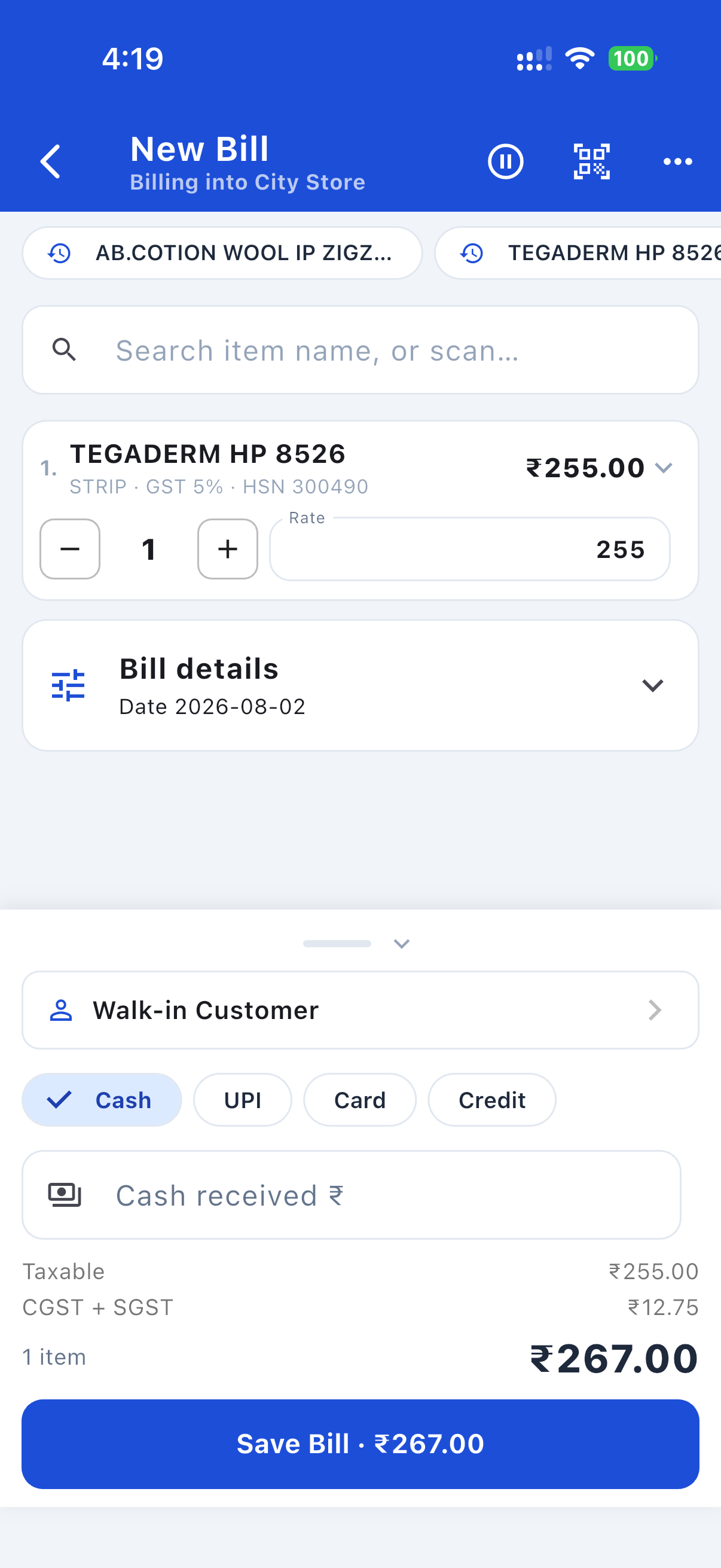
The free Android app is a full remote for your shop: make bills, add customers and suppliers, enter purchases, collect dues, and see reports and profit, all from your phone. It keeps working even when the PC is off, so a bill you make gets its real invoice number through the cloud and lands in your books the moment the PC is back. Hold a sale to serve a quick customer, re-run a regular's usual order in a tap, and switch to a dark theme for night billing.

Bills even when the PC is offReports & duesDark mode

Reports & GST

Daily sales, item movement with profit and margin, sales by staff member, dead stock with the money tied up in it, stock, expiry, reorder, B2B and B2C splits, and receivables by age. For GST: rate-wise CGST/SGST summaries, invoice-wise Sales & Purchase registers, and GSTR-1 / GSTR-3B exports.

GSTR-1 / 3B · E-way bill · Tally XMLProfit & marginPDF + Excel export

Check Your GST File Before You File It

One click checks your GSTR-1 before it goes anywhere near the portal. It names the customer with the mistyped GSTIN, the bill whose tax type does not match the buyer's state, and every item missing an HSN code. Fix the list, then upload with confidence instead of chasing a "processed with error" message afterwards.

Plain-language fix listBefore you upload

Every Customer's Own Price

Sell the same item at different rates to different buyers? The app remembers. Pick a customer and every item comes in at the price they last actually paid, marked so you can see where it came from, with a one-tap switch back to your standard rates. It reads your existing bills, so it works on the customers you already have. It never charges above MRP, and it warns you the moment a remembered price falls below what the item now costs you.

Learns from your billsBelow-cost warning

Expenses and Profit & Loss

Record rent, salary, electricity and labour, then see the one number nobody else shows a shopkeeper: your real profit. Sales without GST, minus what the goods cost you, minus what you spent. A month-by-month chart shows the thing you can never work out in your head, the month your expenses start climbing faster than your profit. A proper Profit & Loss statement, ready to hand your CA as a PDF. No vouchers, no debits and credits, nothing for you to balance.

Real profit, not just salesMonth-by-month trendPDF for your CA

Inventory Management

Batch-wise stock tracking with automatic low-stock and expiry alerts. Stock updates instantly with every sale and purchase, so it's always accurate.

Batch-wiseLow-stock alerts

E-way Bill Generation

Generate a real e-way bill, with its EWB number, straight from a saved invoice, no manual portal upload. Print it or save it as a PDF with the QR code; the number prints on your invoice too. A one-time setup connects your e-way bill account. For wholesalers and distributors on Gold & Platinum.

Real EWB numberPrint / PDF + QR

Works Without Internet

Everything runs on your own PC, so billing never stops when the connection does. No monthly login to a website, no waiting for a page to load between customers. The internet is only needed for AI invoice scanning, e-way bills and optional cloud backup.

Bills even when the line is downYour data, on your machine

It Adapts To Your Trade

Tell it whether you run a pharmacy or another kind of shop, and whether you sell retail, wholesale or distribute. The invoice, the columns, the fields and the reports all change to match, so a chemist gets batches and expiry while a hardware wholesaler gets a full B2B invoice.

Pharmacy · Retail · WholesaleRetailer · Distributor

Cloud Sync & Work Anywhere

Optional and off by default. Your data stays on your PC until you switch it on. Turn it on to back a shop up and use the phone app from anywhere, on any network. With Cloud Sync your phone keeps working even when the PC is off: it shows your shop from the cloud, and a bill you make gets its real invoice number straight away and lands in your books the moment the PC is back.

Opt-inWorks PC-off

Remote Access For Your Accountant

Share a shop with your accountant, a partner or our support team, from their own computer. You send a one-time code, they enter it, and they get that shop over the internet. You choose what each invite allows: view only, where they see everything but change nothing, or full editing, where they can make bills, adjust stock and manage customers and every change lands back in your books within seconds. Nothing starts until you approve their connection, it is limited to the one shop you pick, and you can disconnect anyone any time. Gold shares with one person, Platinum with as many as you like.

View only or full editingOne-time codeDisconnect anytime
Plus everything else you'd expect
All included with your plan.

Import From Other Software

Switching from Marg, Tally or Busy? Bring your items, customers and suppliers across from Excel, CSV or DBF, with smart column matching, in minutes.

Purchase Management

Record supplier invoices, auto-add new products, and return goods (full or partial) straight to the ledger.

Purchase Orders

The app already works out what is running low. Tick the rows and it writes the order for you, grouped by supplier, ready to edit, print or send on WhatsApp. When the goods arrive, the order becomes a purchase entry with everything filled in, and it cannot be received twice by mistake.

Customer Management

Quick-add from billing, instant phone lookup, history search, credit limits, and a full ledger you can hand over as a statement of account.

WhatsApp Invoices & Reminders

Send the bill or a payment-due reminder to a customer's WhatsApp in one click.

Share Your Price List

Turn your stock into a clean price list as a PDF or an Excel sheet, filtered how you like: one category, one supplier, or only what is in stock. Choose the columns, and your purchase cost stays out of anything a customer sees.

Supplier Management

Distributor records with GSTIN, a running ledger, and payments both ways: money you pay out, and refunds or scheme credits you get back.

Estimates & Quotations

Quote a price without touching stock or dues, then turn the estimate into a real invoice in one click when the customer says yes.

Profit & Margin Per Item

See what each item really earned you. Cost is captured at the moment of sale, so your margins stay honest even after prices change.

Money Stuck In Dead Stock

Find the goods nobody has bought in months and see exactly how much of your cash is sitting in them, biggest first. Then act on it from the same screen: mark the price down to clear it, or send it back to the supplier.

Print The Way You Want

Half-page A5, full A4, or a thermal receipt on a 58mm or 80mm roll. Pick your printer, print in colour or black and white, and choose which columns appear on the invoice.

Sell By Weight Or Length

Quantities take decimals, so 1.3 kg, 7.8 metres or half a packet all bill correctly and stock stays exact.

Composition Scheme

On the composition scheme? Bills print as a Bill of Supply with no GST charged, and your 1% turnover tax is worked out for you.

Drug Interaction Warnings

For pharmacies: the app flags known high-risk medicine combinations in the cart before the bill is made. A second pair of eyes for the counter.

Find Anything Instantly

Press Ctrl+K anywhere to search every item, customer, supplier and bill at once, then jump straight to it.

Expiry Control

See what is expiring and act on it: discount a near-expiry batch to clear it, or send it back to the supplier as a debit note with the tax credit reversed for you.

Barcode & Labels

Generate barcodes, print label sheets, and scan to bill with a USB scanner or your phone.

Multiple Businesses

Run more than one shop from a single install and switch between them in a click.

Logins & Roles

Admin and staff accounts with per-shop, per-feature access and easy password recovery.

Sales By Staff

See what each person at the counter sold for any date range: bills made, value, discount given, cash against credit, and refunds they processed. Owner-only, so staff cannot see each other's numbers.

Live Dashboard

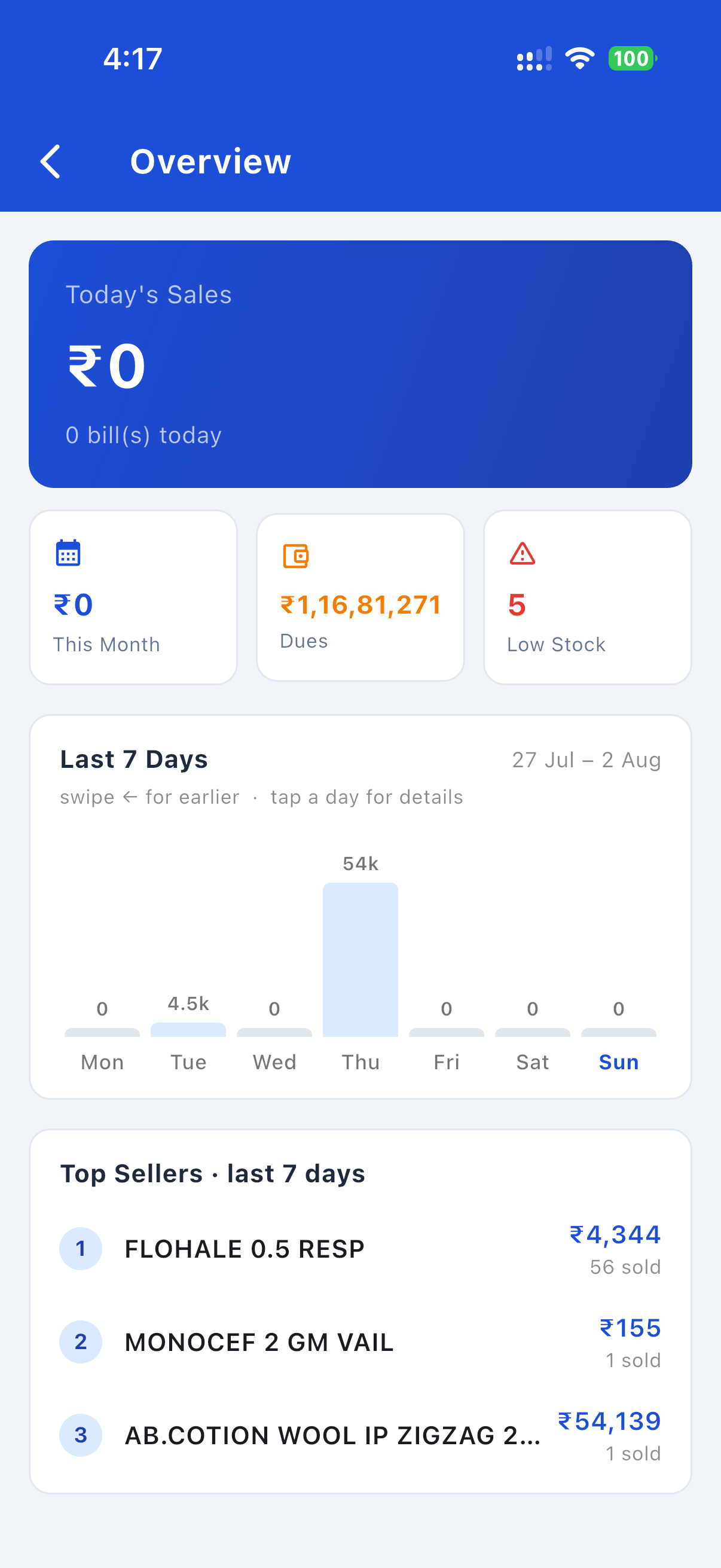
Today's sales, dues, low stock and expiring stock at a glance the moment you open the app.

Smart Alerts & GST Reminders

A live alerts bell: GST filing due dates (GSTR-1/3B, monthly or QRMP, and composition), a heads-up when sales near the ₹40 lakh GST registration limit, plus expiring stock and overdue dues.

Activity History

A timestamped audit trail of every sale, purchase, payment, edit and cancellation, showing which staff member did it. Filter the whole history by person.

Recycle Bin

Deleted items, parties and purchases are recoverable for 30 days before they clear out.

English / हिंदी / Hinglish

Switch the whole interface with one click so staff work in the language they prefer.

Backup & Restore

Automatic backups to any folder or drive on a schedule you set, plus one-click manual backups. Move to a new computer in under a minute.

Off-Site Cloud Backup

A backup on the same computer does not help if that computer is stolen or its drive dies. Switch this on and an encrypted copy of your whole shop goes off the machine every day, locked with your licence key so nobody else can read it. On a new PC, sign in and restore: your bills, stock, ledgers, shop settings and invoice layout all come back.

Updates That Just Arrive

New features and fixes install themselves in the background. Every release is signed by Layerdots Media PVT LTD, so Windows knows exactly who made it.

Shop Configuration

Set name, GSTIN and bill prefix; pick your category and type, and the app adapts to match.

Your shop in your pocket

The free phone app runs your shop from your phone: bill, collect dues, check stock and see reports, even when the PC is off.

Making a bill on the Layerdots phone app: item, GST split and total

Bill on the go

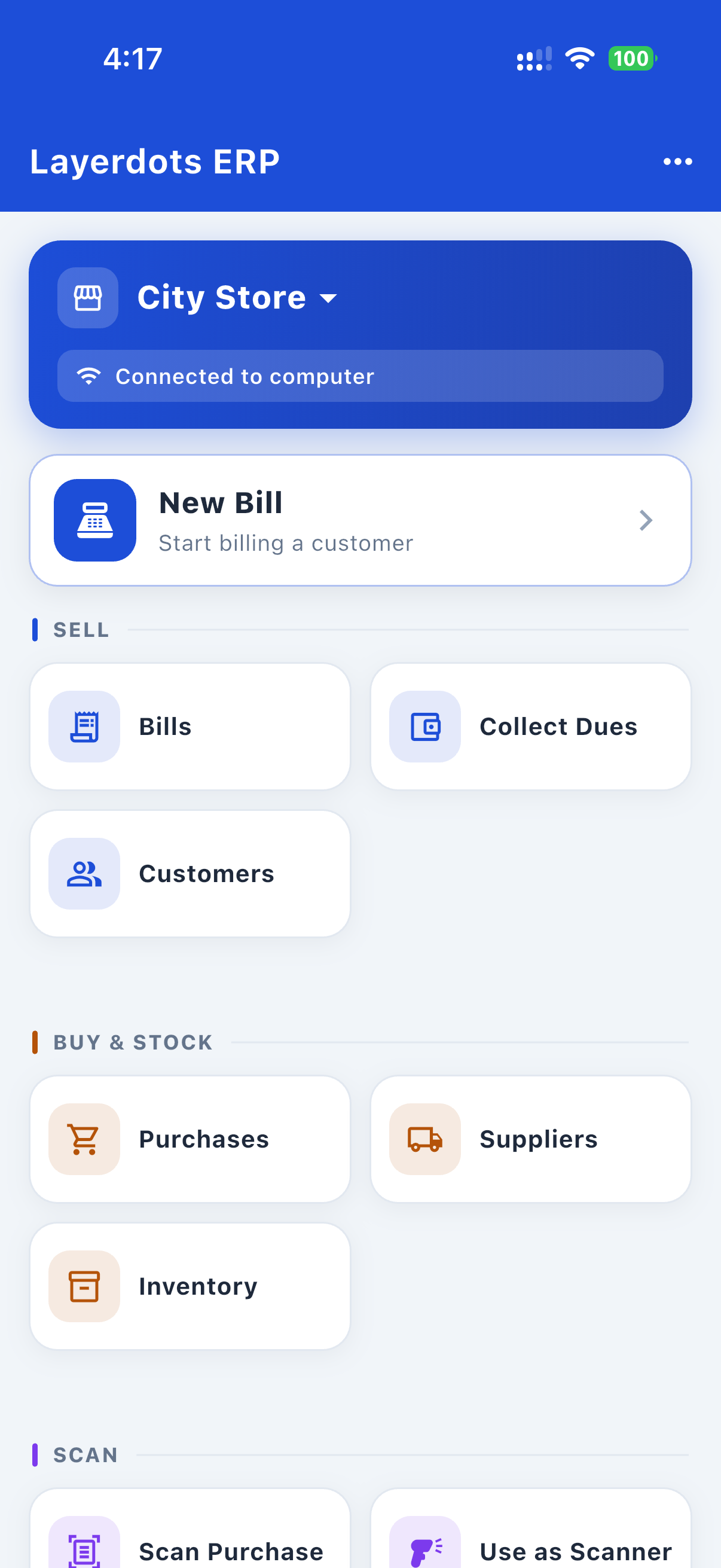
Layerdots phone app home screen, connected to the shop computer

Everything in one place

Sales overview, 7-day chart and top sellers on the Layerdots phone app

Sales & reports anywhere

See it in action

A quick look at the Windows desktop app. Use the arrows to browse.

How your data flows

Scan invoices. Skip the typing.

1. Photograph the supplier's bill with your phone.

2. The same items appear on your computer. No typing.

Set up the same day

No setup fees and nothing to configure on a server. Install it, enter your shop details, and start billing.

1

Install

Run the setup file on any Windows PC. Takes under 2 minutes.

2

Configure

Pick your business type, enter your shop name and GSTIN. Done in 60 seconds.

3

Add Stock

Add products manually or scan a supplier invoice with AI to import instantly.

4

Start Billing

Search, add, pay, print. Your first bill in under 30 seconds.

Get Layerdots ERP, free for 7 days

Install on your Windows PC or your Mac. Add the phone app to bill, check stock, collect dues and see reports from your phone. No online account, no card.

Windows App
Windows 10 / 11 · 64-bit · the full ERP installer (.exe)
Download for Windows
Mac App
macOS 12 or newer · signed and notarised by Apple (.dmg)
Which Mac do you have?
Android App
Bill, collect dues, check stock and see reports · works even when the PC is off
Get it on Google Play
iPhone App
The same app for iPhone and iPad · bill, dues, stock and reports
Download on the App Store
The billing programs Indian shops actually run on almost never work on a Mac. This one does.

A full shop system, billing through purchases, inventory, GST returns and reports, is a Windows habit in India. The desktop packages most shops know publish Windows-only system requirements, and what they offer a Mac owner is a workaround: a Windows machine rented in the cloud, or a compatibility layer to fake one on your own hardware.

Layerdots installs straight onto macOS, built natively for both Apple-chip and Intel Macs, signed and notarised by Apple. No Parallels, no Boot Camp, no rented Windows desktop, no virtual machine. It is the same application as the Windows one, with the same data, and one licence covers both.

On your phone right now? Send the download link to yourself on WhatsApp and open it on your computer.

Windows
Downloads the signed installer (.exe). Just run it. It is code-signed by Layerdots Media PVT LTD, so if SmartScreen warns on first run, click More info → Run anyway.
Mac
Not sure which build? Apple menu → About This Mac. An M-series chip (M1 or newer) takes the Apple-chip build, Intel takes the Intel one. Both are notarised by Apple, so they open with no security warning: drag the app into Applications.
Android
Installs from Google Play, and updates itself from there.
iPhone & iPad
Installs from the App Store, and updates itself from there. The same app as Android: bill, dues, stock and reports.

Yearly plans, everything included

Every plan includes full billing, inventory, purchases, reports and backup. The only difference is how many invoice scans and shops you get.

Trial
Free
7 days free
  • Full access to all features
  • 10 AI invoice scans/month (Excel unlimited)
  • Unlimited bills & products
  • GST reports
  • Phone app: make bills even when the PC is off
  • Use one shop on multiple PCs
  • One-click e-way bills (Gold & Platinum)
Start the 7-day free trial
Basic
3,500
+ 18% GST = ₹4,130/year
  • Billing, inventory & GST reports
  • 200 AI invoice scans/month
  • Single shop
  • Remote Access: view a shop shared with you
  • Phone app: make bills even when the PC is off
  • Unlimited bills & products
  • E-way bills
  • One shop on multiple PCs (Gold & Platinum)
  • Remote Access: share your shop with others
  • Priority support
Buy Basic on WhatsApp
Platinum
11,000
+ 18% GST = ₹12,980/year
  • Everything in Gold
  • 1,500 AI invoice scans/month
  • 200 e-way bills/month
  • Up to 3 shops
  • Remote Access: share with unlimited people
  • Phone app: make bills even when the PC is off
  • Use one shop on multiple PCs
  • Unlimited bills & products
  • Priority support
Buy Platinum on WhatsApp

To buy, message us on WhatsApp or call +91 93682 76704. Your licence key activates instantly. When the trial ends your data stays on your PC; activate any time to continue.

Common questions

What happens when the 7-day trial ends?

Your data stays on your PC. Billing pauses until you activate a licence key, and you can buy one any time on WhatsApp. Activate and everything continues exactly where you left off.

Does it work offline?

Yes. Billing, inventory, reports and backups all work without internet. You only need internet for the optional extras: AI invoice scanning, Cloud Sync and app updates.

Can I move to a new PC?

Yes. Take a one-click backup from Settings, copy it to the new PC and restore it there. If you use Cloud Sync, just activate the new PC with the same licence key and your data downloads automatically.

Can I bring my data from Marg, Tally, Busy or Excel?

Yes. Export your items, customers and suppliers from your current software as Excel, CSV or DBF, then import the file. Columns are matched automatically and you can adjust them before saving.

How many shops can I run on one plan?

Basic covers 1 shop, Gold up to 2 shops and Platinum up to 3 shops, all from a single install and switchable in one click.

Can I generate e-way bills?

Yes. Wholesalers and distributors can generate a proper e-way bill with a real EWB number straight from a saved invoice. A one-time setup connects your e-way bill account (your GSTIN's API username and password from the government portal). This is available on the Gold and Platinum plans; it is not included in Basic or the free trial.

How does Remote Access work?

You pick a shop, choose what the invite allows, and the app gives you a one-time code that you send to your accountant (or to our support team) on WhatsApp or over a call. They enter it in their own Layerdots ERP and get that shop on their computer, over the internet. A view only invite lets them see everything without changing anything. A full editing invite lets them make bills, adjust stock and manage customers in your shop, with every change reaching your PC within seconds; editing uses your shop's own invoice number series so numbers never clash. Either way nothing starts until you approve their connection, they only get the one shop you shared, and you can revoke access any time from the same screen. It needs Cloud Sync turned on for the shared shop and an active plan on both sides. Gold can share with 1 person, Platinum with unlimited people; Basic can receive a shared shop but not give one.

Can I use it on two computers?

Yes. Activate the same license key on both PCs. On the second computer, open Settings, then Data, then "Use this license on two computers" and connect it to your existing shop (the app also offers this right after activation). The whole shop downloads to the second PC, and from then on both computers work on the same shop: bills, stock and customers stay in sync both ways, and both PCs share one invoice number series so two bills can never get the same number. Both computers need internet to bill.

How do I buy?

Message us on WhatsApp or call +91 93682 76704. After payment we send your licence key, and you activate inside the app in under a minute.

Your data stays with you

Local-first: your business data lives on your PC by default. Cloud sync is optional and off until you choose to turn it on.

Local-First Storage

Your sales, customers and inventory stay on your computer unless you turn on Cloud Sync.

You're in Control

We don't collect or sell your data. Cloud Sync is opt-in, into a private account only you can access.

Signed, Notarised & Always Up to Date

Every installer is digitally signed by Layerdots Media PVT LTD, a registered Indian company, and the Mac builds are notarised by Apple. The app updates itself automatically.

Easy Backup

Back up your entire database with one click. Keep a copy on a USB drive for peace of mind.

Tested on a shop far bigger than yours

We loaded Layerdots with more data than a real shop will ever hold: 2.5 million products, 2 million invoices and 6 million sale lines. Then we fixed everything that struggled. Your shop is nowhere near this size, which is rather the point.

Search stays instant

Finding a medicine across 2.5 million products takes 7 milliseconds. Barcode scanning is faster still. Your counter never waits for the software.

Billing never blocks

You can keep saving bills while a heavy report runs in the background. A sale saved during one takes about a millisecond. The report simply gets on with it.

Reports that used to hang

Dead Stock across 2.5 million items went from over three minutes to under three seconds. Outstanding-balance checks that once took hours now finish in seconds.

The window stays alive

Big reports run in a separate process, so the app keeps responding while they work. Honestly: a report covering a whole year of six million sale lines still takes a little time. You just get a spinner instead of a frozen screen.

Start billing in the next ten minutes

Download the free 7-day trial. No online account, no card, no commitment.

Download Free