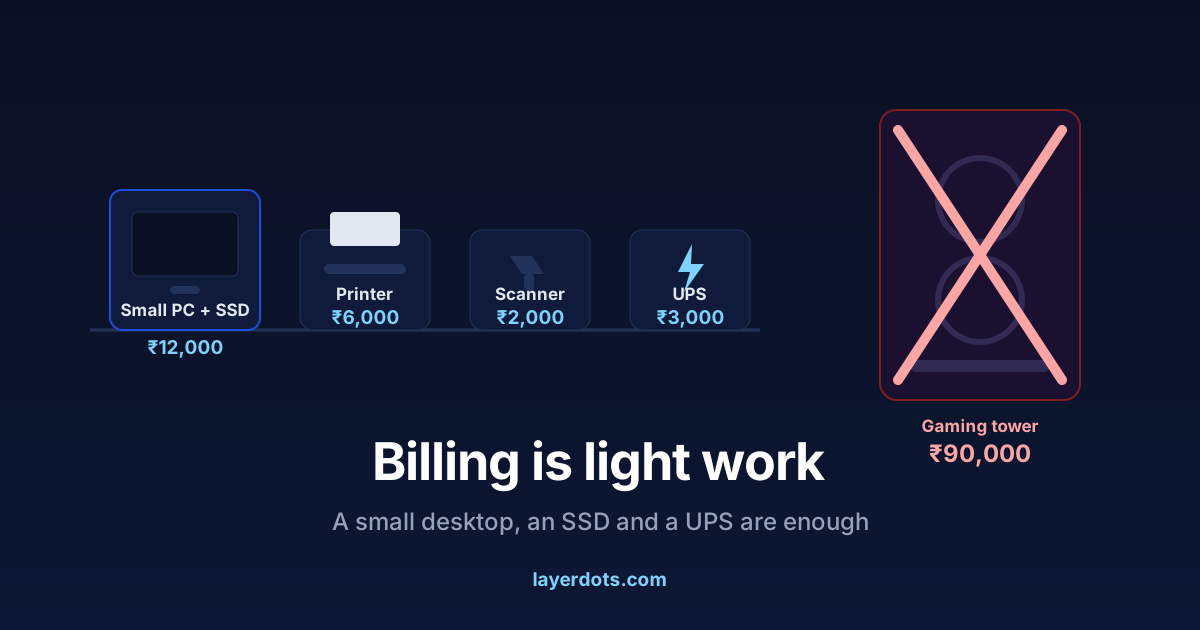
Walk into a computer market, say the machine is for your shop, and you will be steered toward a tall tower with glowing fans and a processor named like a fighter jet. It will cost three or four times what the job needs. Billing is among the lightest work a computer does. This is about buying for that job: the single part that decides how the machine feels, where a used machine is the better buy, and what the whole counter costs once the printer, the UPS and the software are on the same bill.
Billing is light work; dust and heat are what retire shop computers
A billing program does small things many times a day. It writes one bill into a database, prints it, and searches old bills when a customer comes back. Each bill is a few kilobytes of text and numbers; ten years of them take less disk space than one evening of phone videos. There is no video editing here and no gaming, nothing that rewards a fast processor or a graphics card.
What ends a shop computer's life is the shop. Dust pulled into the fans, heat in a cramped corner, power that comes and goes, and the occasional spilled tea. So the useful questions are physical. Will it fit behind the counter? Does it have few enough vents that dust takes years rather than months to choke it? A small desktop, the compact size that offices buy, answers both better than any tower.
The SSD is the upgrade you feel; the processor is not
The slowness you have felt on an old shop PC, the minute-long boot and the pause before every search, is almost never the processor. It is the hard disk, the old spinning kind. Replace it with an SSD and the same machine boots in seconds and finds a bill while the customer is still talking. An ordinary processor with an SSD beats an expensive processor with a spinning disk for this work every time.
Rules of thumb: any desktop processor sold in the last several years is enough, 8 GB of RAM is comfortable, and a 256 GB SSD holds Windows, the billing software and many years of data with room to spare. Layerdots ERP keeps the books in a local database file on that disk, and each bill save is a tiny write, so it runs well on exactly this class of machine. The same rule answers the question about an eight-year-old computer. If it has an SSD and 8 GB it will probably serve for years more; if it has neither, that upgrade costs a fraction of a new machine and removes most of the slowness. Layerdots ERP has a separate build for Windows 7 and 8, so an old version of Windows is not by itself a reason to replace the machine. Visible hardware faults are.
If the salesman is to remember one sentence from you, make it this: "I want an SSD, 8 GB of RAM, and the smallest cabinet you have." Put the money he wanted for a bigger processor into a decent keyboard and a UPS.
Refurbished office desktops, and when new is worth it
Refurbished ex-office desktops, the compact Dell, HP and Lenovo machines that companies replace on a fixed cycle, are among the best value in computing. They were built for five years of office use and they sell for roughly the price of a printer. For a billing counter they are the right tool at a quarter of the price.
Check four things before a refurb reaches the counter: an SSD already fitted (or fit one before it goes in), 8 GB of RAM, genuine activated Windows, and a seller whose shop you can walk back into, with a few months of warranty in writing. New is worth it if you want a long onsite warranty, or if you are a regular GST-registered dealer buying on a proper tax invoice with your GSTIN on it; ask your accountant whether input tax credit applies to the purchase under Section 16 of the CGST Act. Composition dealers cannot claim that credit.
Windows or Mac: keep the one your hands know
Billing software worth buying runs on both; Layerdots ERP ships for Windows and for macOS. Windows machines are cheaper, every printer in the market supports them, and every town has someone who can repair one. A Mac Mini is small, quiet and long-lived, and if your hands already know a Mac it makes a good counter machine; we have written separately about GST billing on a Mac. The rule is not to switch platforms at the same time as opening a shop. Retraining your fingers during the morning rush costs more than any price difference saves.
Ports, printer, scanner, and a UPS for the power cuts
Count USB ports before you pay. A thermal printer, a barcode scanner, a keyboard and a mouse already want four. The scanner is the simple purchase: a basic USB scanner types the barcode as if it were a keyboard, so nearly any model works. For printing, an 80 mm thermal printer covers receipts; if you issue A5 or A4 tax invoices, a small laser printer prints them cheaply per page.
The UPS is not optional in India. A power cut at the moment the computer is writing to the disk is the one event that databases, and Windows itself, have reason to fear. A 600 VA UPS buys the minutes to finish the bill and shut down properly, and it pays for itself the first time it saves you a corrupted Windows and a day at the repair shop. A laptop carries its battery built in, which is the strongest argument for putting a laptop on a fixed counter; otherwise a desktop gives more machine per rupee, cheaper repairs, and a full-size screen and keyboard.
The disk now holds your books
Software like ours keeps the data in the shop, on this machine, which is why billing does not stop when the internet does. The other side of that is that this disk is now carrying your books. SSDs fail rarely, but rarely is not never, and no drive survives theft or a flood. Decide the backup routine the day the machine arrives, not the day it dies: a copy onto a pen drive or external disk on a fixed day of the week, plus an automatic cloud backup. Layerdots ERP has backup, restore and cloud backup built in, and our shop data backup guide describes a routine that takes five minutes a week.
You will want an internet connection now and then, for activation, updates, cloud backup and the phone app, but not for billing. A mobile hotspot for a few minutes a day covers all of it.
The whole counter, priced
Street prices move with the season and the city, so these are rough 2026 figures for bargaining, not quotations.
- Refurbished small desktop with SSD, with monitor: roughly ₹10,000 to ₹16,000
- New budget desktop with monitor: roughly ₹25,000 to ₹35,000
- 80 mm thermal printer: roughly ₹5,000 to ₹9,000
- Barcode scanner: roughly ₹1,500 to ₹3,000
- 600 VA UPS: roughly ₹2,500 to ₹3,500
A complete refurb-based counter, everything included, comes to somewhere near ₹20,000 to ₹30,000. That is less than the gaming tower alone, and it bills just as fast. On top of the hardware sits the software, which is a yearly cost rather than a one-time one: Layerdots ERP starts at ₹3,800 plus GST a year after a 7-day trial, and we have compared what billing software costs in India separately. Budget the machine once and the software yearly, and year two holds no surprises.