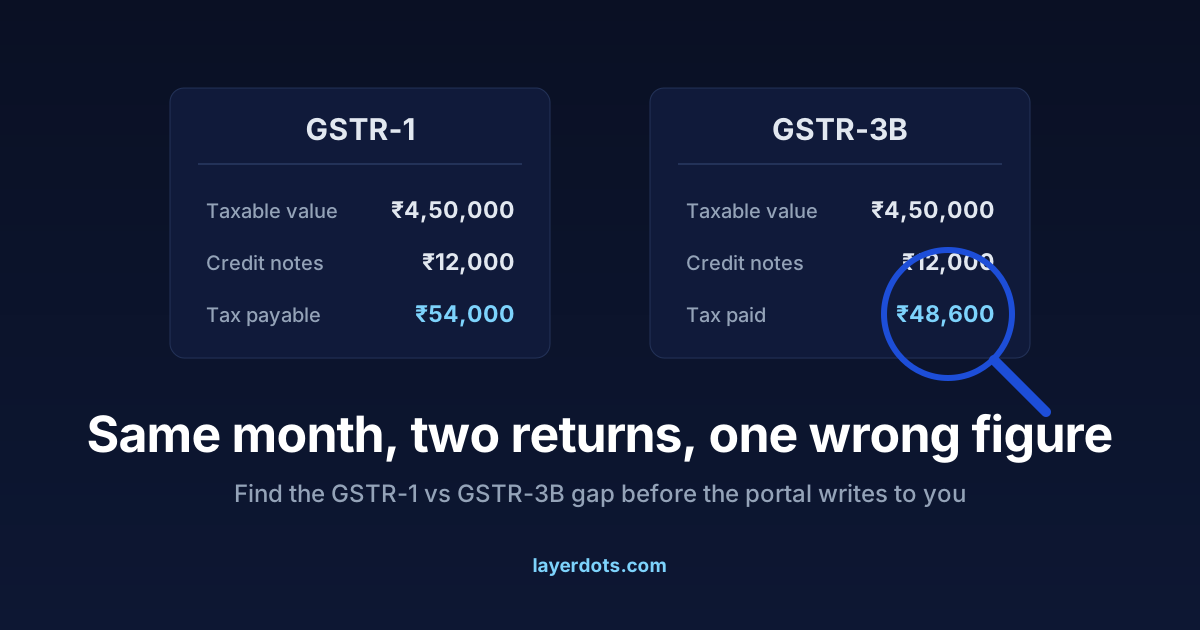
Every registered shop files the same two returns for the same month. GSTR-1 says what you sold. GSTR-3B is where you pay the tax on it. They describe one set of bills, so they should carry one set of figures. When they do not, the GST portal notices, because comparing them is now automatic. This is why they drift apart in an ordinary shop, how to catch the gap at month end, and how to correct it.
Two returns from one set of bills
GSTR-1 is the statement of outward supplies. It carries the detail: B2B sales bill by bill with the buyer's GSTIN, B2C sales as consolidated totals, credit and debit notes, and the HSN summary in Table 12. It collects no money. Its job is information, and other people rely on it: your B2B buyers' GSTR-2B, the statement their input tax credit depends on, is built from your GSTR-1.
GSTR-3B is the opposite, almost no detail and all money. It is a self-declared summary, a handful of totals, and the return through which tax reaches the government.
So GSTR-1 is what you told the world you owe, and GSTR-3B is what you paid. For any month the two should be equal, and a gap in either direction is a problem. Pay less than GSTR-1 declares and the portal treats the shortfall as admitted but unpaid tax. Pay more and your B2B buyers cannot see the sales their credit depends on.
Five habits that open the gap
- A credit note in one return but not the other. A customer returns goods, you issue a credit note under Section 34 and reduce the tax you pay in GSTR-3B, but the note never gets entered in GSTR-1's credit note table. Or the reverse: the note is in GSTR-1 and the 3B figure was typed from the old total.
- A late bill. An invoice missed in this month's GSTR-1 gets added to next month's, but the tax was paid this month. Each month now shows a gap, in opposite directions.
- Hand-typed figures. GSTR-1 is uploaded from software or a spreadsheet, while GSTR-3B is typed into the portal from a register. One transposed digit and the returns disagree.
- An amendment on one side only. A wrong invoice is corrected through GSTR-1's amendment tables, but nobody adjusts the tax in any GSTR-3B.
- A cancelled bill counted once. A bill cancelled at the counter still sits in one return's total. What cancellation does to your records is in the rules for cancelled invoice numbers.
None of these is dishonesty, and none is a portal bug. Each is the same sale recorded in two places by two different routes.
The portal compares them, so compare first
Until a few years ago a mismatch waited quietly for an officer to find it. That has changed in two specific, checkable ways.
First, the Explanation to Section 75(12) of the CGST Act, in force since 1 January 2022, says that tax declared in GSTR-1 but not included in GSTR-3B counts as self-assessed tax. Self-assessed tax can be recovered under Section 79 without a show-cause notice; in the law's eyes you admitted owing it when you filed GSTR-1.
Second, Rule 88C, inserted in December 2022, made the comparison automatic. When your GSTR-1 liability for a period exceeds your GSTR-3B liability by more than the limits set under the rule, the portal sends an intimation in Form GST DRC-01B. You then have seven days to pay the difference through DRC-03 or explain it in Part B, with the reason that applies, such as an invoice reported in GSTR-1 last month with the tax paid this month. Until you respond, Rule 59(6) blocks your next GSTR-1, which holds up your buyers' credit, and an unanswered intimation can move to recovery under Section 79.
The comparison will happen whether or not you do it. The only choice is whether you find the difference at month end in your own shop, or read about it in a DRC-01B near a deadline.
A ten-minute check before filing 3B
Do this after GSTR-1 is ready and before GSTR-3B is filed, every month.
- Put the GSTR-1 summary and the draft GSTR-3B side by side and compare four numbers: taxable value, IGST, CGST and SGST for outward taxable supplies (Table 3.1(a) of GSTR-3B) against the GSTR-1 totals net of credit notes.
- Check that every credit note issued in the month appears in GSTR-1, and that the 3B figure was reduced by the same notes, not a different set.
- Count the bills. If the billing records show 412 bills and the GSTR-1 upload covers 409, three went missing somewhere.
- Look at the first and last invoice numbers of the month for continuity, so a skipped or cancelled number is explained rather than discovered.
If all four figures match to the rupee, file. If not, do not nudge one return to match the other. Find which side matches the physical bills. The bills are the truth and both returns are copies of it; a GSTR-3B forced to equal a wrong GSTR-1 is two wrong returns that agree.
Correcting each return
GSTR-3B cannot be revised. Once filed, it is filed. The accepted method, set out in Circular No. 26/26/2017-GST, is to adjust in a later month's GSTR-3B. If you underpaid, add the difference to a following month's figures and pay interest on the shortfall under Section 50. If a DRC-01B has already arrived, pay through DRC-03, or explain in Part B if the difference is genuinely timing. If you overpaid, reduce a later month's liability by the excess.
GSTR-1 corrects through its amendment tables in a later period: Table 9A for B2B invoices, Table 9B for credit and debit notes, Table 10 for B2C summaries. The outer limit under Section 37(3) is 30 November after the financial year ends, so a March mismatch does not stay fixable forever. The earlier a gap is found, the more options remain open.
Whatever you adjust, write down the trail: the month of the error, the month of the correction, and the working between the two figures. If a query comes, that page of working turns a long afternoon into a two-line reply.
One database, both returns from it
Look back at the five causes. Each needs two sources of truth: a bill book and a register, a software export and a hand-typed portal entry, a corrected invoice and an uncorrected summary. Remove the second source and the drift has nowhere to start.
That is how Layerdots ERP approaches it. Bills, credit notes and amendments are in one local database on your own computer, and both returns are produced from it: the GSTR-1 upload files, including the HSN summary for Table 12, and the GSTR-3B file for the portal, come from the same rows. A credit note recorded once flows into both. One limit stands: software cannot reconcile what it never saw, so if a figure is retyped into the portal by hand, compare it against the export before submitting. The reports put both sets of numbers on one screen, so the comparison takes a minute rather than an evening.