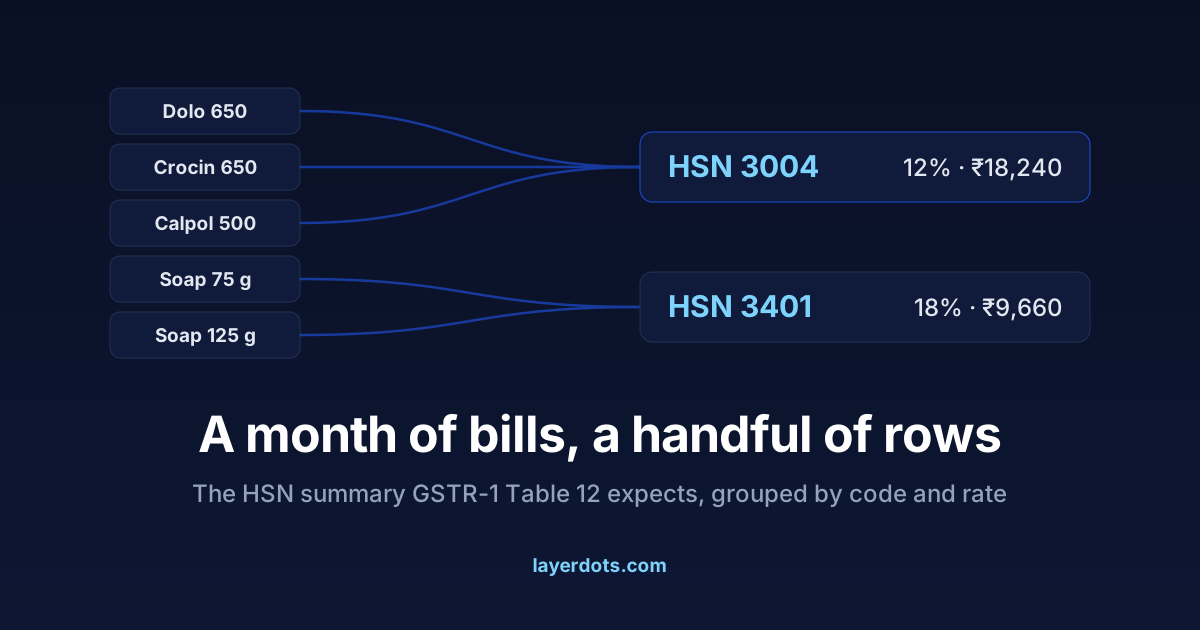
Most of GSTR-1 is a list of your invoices. Table 12 is the exception: a summary of everything you sold in the period, grouped by HSN code. Since mid 2025 it has also been the sheet most likely to bounce an upload, because the portal now checks it instead of merely accepting it. If your file has just come back with an HSN error a day or two before the due date, this covers what the table wants, why the error appeared, and how to make next month's summary build itself.
One row per HSN code and rate, not one per bill
Every item you sell has an HSN code, the Harmonised System of Nomenclature, the numbering that puts medicines under one heading and soap under another. Table 12 asks you to take the whole period's sales and compress them into one row per code and GST rate: the code, its description, the unit (UQC), total quantity, taxable value and the tax amounts.
A shop that printed 900 bills across 400 products in a month might compress into fifteen or twenty rows. Three brands of paracetamol are all HSN 3004 at the same rate, so they land in one row together. The government does not want your bills repeated here. It wants the shape of your trade.
Four digits up to ₹5 crore, six above it
How many digits you report depends on turnover, and the rule has a name you can check: Notification No. 78/2020-Central Tax, dated 15 October 2020, in force from 1 April 2021. If your aggregate turnover in the previous financial year was up to ₹5 crore, you report 4-digit codes. Above ₹5 crore, 6 digits. Aggregate turnover is measured across your PAN, every GSTIN you hold added together.
The same notification carries a relaxation worth knowing. Up to ₹5 crore, the HSN code on the invoice itself is mandatory only for B2B invoices and optional on B2C ones. Table 12 still expects the summary either way. So the practical answer for a small shop is to keep 4-digit codes on every product regardless, and let the relaxation apply to the printed bill rather than to your records.
₹5 crore does a lot of work in GST. It is also the line above which e-invoicing applies to B2B invoices, but that is a separate obligation with its own rules. Being under the line for one does not settle the other.
Three spellings of one soap
The classic failure does not start in the return. It starts in the records. A shop billing from Excel or from memory ends up with "Dettol 250ml", "dettol soap" and "Dettol bath soap" as three separate lines: one carrying HSN 3401, one carrying a code copied from a different product, one carrying nothing. At filing time somebody has to reconcile the three into one truthful row, by hand, under deadline.
The rate side has the same problem. If one spelling of the product was billed at 18% and another at 5%, the summary either shows two rows for one product or shows totals that do not match the invoice tables. Table 12 is unforgiving in a useful way. It exposes exactly the mess that scattered records hide during the month.
Since May 2025 the table has two tabs
From the May 2025 return period, the Phase-III changes GSTN announced in its January 2025 advisory apply to Table 12. The table is split into two tabs, one for B2B supplies and one for B2C. On the portal, HSN codes are picked from a dropdown rather than typed, with the description filled in from the code. And the portal cross-checks the summary against the values in the rest of the return; some of those checks warn today rather than block, and the direction of travel is towards blocking.
For a counter shop this mostly means one thing. If you ever bill a registered buyer, even occasionally, those sales need their own rows on the B2B tab. A summary that lumps everything under B2C no longer matches what the portal computes from your invoice tables.
Store the code on the product, once
Everything above has one fix, and it is not a filing-day fix. Store the HSN code and the GST rate on the product record when the product is created. Every bill then inherits the code, every spelling of the product is the same record, and Table 12 stops being a reconciliation job. It is your sales grouped by a field that was correct all month.
This is the main reason to move billing out of a spreadsheet, and what changes when you move from Excel to billing software is written up separately. In Layerdots ERP the code lives on the product card, bulk import carries codes in from the sheet you already have, and the GSTR-1 export builds Table 12 for you in both the portal JSON and the Offline Tool Excel, split into the B2B and B2C sheets the portal expects.
What the rejection messages mean
The rejections we see fall into four families.
- Wrong digit count for your band. Four digits where six are due, or a code padded or truncated to the wrong length.
- A code that is not in the portal's master list. The dropdown prevents this online, but files prepared outside the portal are validated against the same list, so an invented or mistyped code bounces.
- A unit the portal does not recognise. Quantity must be in a UQC from the portal's own list (NOS, PCS, KGS, BOX and so on). A home-made unit like "strip" or "pkt" fails the check.
- The summary in the wrong place in the file. The upload formats are strict about structure. We have watched the portal reject a file whose every row was correct because the HSN block sat at the wrong level of the JSON. If your software produced the file, this one is its bug to fix, not yours.
Whatever the message says, read it as a timing problem. The error surfaces at filing time, but the mistake was made weeks earlier, when a product was created with a missing or wrong code. Fix the product record, not only this month's sheet. A sheet patched by hand and never traced back to its source is also how GSTR-1 and GSTR-3B start disagreeing, which is a harder conversation than a bounced upload.
Two questions that follow
My supplier's invoice shows an 8-digit code. Which digits do I report?
The 8-digit code is the full customs tariff classification, and the GST codes are the first 4
or 6 digits of it. Report the first 4 if your turnover band is up to ₹5 crore, the first 6
above that. Storing the 6-digit code on the product is the safe middle: it satisfies both bands
and survives a change of band.
The upload failed only on the HSN sheet. Is the rest of my return lost?
No. A rejection is a fix-and-resend, not a penalty, provided you still file by the due date.
The error report normally names the sheet and the row, so correct that entry, regenerate the
file and upload again. Then put the same correction on the product record, so the row is right
by itself next month.