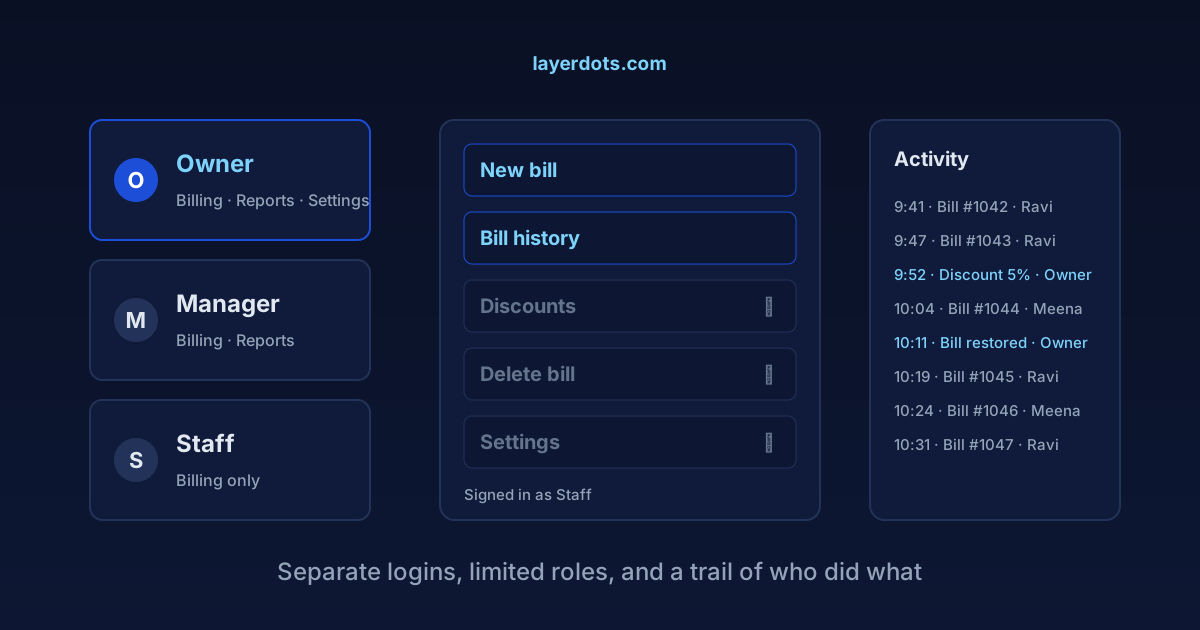
You cannot stand at the counter twelve hours a day. At some point the billing screen belongs to someone else: a salaried boy, a relative, a manager you mostly trust. For most shops that goes fine. But when the drawer keeps counting a little short, the shortfall rarely announces itself. It is 200 here, 500 there, and it never leaves a note. This is about what billing software can do about that, separate logins, limited permissions, an activity trail and a recycle bin, and about what it cannot do, because pretending otherwise sells licences and catches nobody.
Five hundred at a time
A stolen cash box is obvious the same evening. The losses that eat a shop's margin look different: small, plausible and repeated. A sale rung up short. A discount given quietly. A bill that existed at noon and did not exist at closing. None of these is worth a police complaint on its own, and each has an innocent explanation ready, which is why they repeat. Five hundred rupees a day is around fifteen thousand a month, and on a counter running thin margins that is the difference between a profitable month and a confusing one.
Worth saying plainly: most staff are straight. The trouble is that a counter with no records treats straight and crooked people identically, and gives you no way to tell a leak from a mistake from plain bad luck.
One shared password means nobody did anything
The most common setup is one login for the whole shop, or no login at all. Whoever is at the counter bills. The moment something looks wrong, "who deleted this bill?" has exactly one answer available: nobody knows.
A shared login does two bad things at once. It makes every action anonymous, so a pattern can never be traced to a person. And it makes every person a suspect, so your straight staff carry the cloud for shifts they did not work. Separate logins fix both. When each person signs in as themselves, an edit or a deletion carries a name. So does its absence.
Where the money goes
- The sale without a bill. Cash comes in, no bill is made. No software prevents this at the moment it happens, whatever a salesman tells you. What records do is make it visible later: if bills say 40 strips sold and the shelf is missing 46, a stock report asks the question for you. One more reason to bill everything, however small.
- The quiet discount. Ten percent off for a friend costs you exactly your margin. On a shared login it looks like a business decision. On personal logins it is a line with a name on it, and named discounts get rarer.
- The deleted bill. The oldest counter trick: make the bill, take the cash, delete the bill later. The day's total looks normal, minus one sale nobody remembers.
- The udhaar entry. Credit sales are the softest spot, because cash and paper separate in time. A payment collected against a ledger but never entered stays in a pocket. A clean customer ledger closes that gap, and it is the same ledger that helps you recover the udhaar itself.
What a counter login needs, and what stays with the owner
Locking everything down fails in the other direction: a counter that stalls waiting for the owner's password loses customers instead of cash. The useful split is dull and practical. A person at the counter needs to make and print bills, search old bills, add a customer and record a payment. What they do not need in their daily work: deleting saved bills, changing prices, reading profit and purchase reports, touching settings, or managing other people's logins. Keep the first list open and the second list yours.
In Layerdots ERP this is the staff logins feature. Each person signs in as themselves, with an admin or a staff role. For a staff login the admin ticks which shops it may open and which parts of the app it may use, each a separate permission: billing, inventory, purchases, customers, expenses, reports, history and settings. Expenses are deliberately separate, since an expense log holds salaries and rent. Managing users, creating shops, the licence and backups are admin-only and cannot be granted to a staff login at all. A billing-only login bills at full speed all day and never opens the purchases screen or the reports. On top of that, a delete-protection password can be set so that deleting a bill, a purchase, a product, a customer or an expense asks for the password first, whoever is signed in. Being away from the shop also no longer means being blind to it: with the phone app you can check the day, or bill from your phone when the shop computer is off.
The activity log
Alongside logins, the app keeps an activity history: the actions that matter at a counter, each with a name and a time attached. Bill made, bill edited, bill deleted, payment recorded.
The value lies less in the day you catch someone than in every day before that. The 500-rupee leak survives on anonymity, and a counter where actions carry names behaves differently from the first week, without a single confrontation. It works like the shutter lock: it rarely catches a thief in the act, and it mostly makes the attempt not worth it.
A deleted bill sits in the bin for 30 days
In Layerdots ERP a deleted bill does not vanish. It goes to a recycle bin and stays there for 30 days, where the owner can review it and restore it. The person who deletes a bill at 2 pm hoping it is gone by closing time is wrong twice: the deletion is in the activity history, and the bill itself is sitting in the bin.
There is a tax reason to care too. Rule 46(b) of the CGST Rules requires tax invoices to be numbered in a consecutive series, unique for the financial year. A bill that silently vanishes leaves a hole in that series, and a hole in the series is a question an officer, or your own accountant at GSTR-1 time, is entitled to ask. A recycle bin means the answer exists.
It protects the people who did nothing wrong
Some owners hesitate here, because giving a long-serving employee a limited login feels like an accusation. It is not, any more than locking the shutter at night accuses the neighbourhood. A limited role protects the staff member as much as it protects you: when the drawer is short, the trail clears the people who did nothing, by name. Without records, suspicion lands on everyone and stays there.
Two limits worth stating. User controls are not unique to us; Tally, Marg and Busy have user management of their own, and if you already run one of them, learn its controls rather than leaving them off. What a local-first desktop app adds is that all of this works with no internet at all, on data stored in your own machine. And no software survives a shared owner password. If the master login is taped to the monitor, everything above is decoration.
Questions that come up
Will separate logins slow down a busy counter?
No. A person signs in when they take the counter, not on every bill. After that, billing is
the same screen and the same keys. A permission removes buttons a person should not press; it
does not add steps to the ones they should.
My nephew runs the shop when I travel. Should I give him the owner
password?
Give him his own login with wider permissions instead, or a second admin login if he truly
needs everything. The moment two people share one password, you are back to the anonymous
counter. The trail then still records his actions under his name, which protects him as much
as you.
Can software stop a sale that was never billed at all?
No, and be careful with anyone who claims yes. Cash handed over with no bill leaves no trace
at the moment it happens. What software can do is show it sideways: stock counts drift away
from recorded sales, and daily totals sag on particular shifts. The pattern surfaces, and then
the decision is yours, made on numbers instead of suspicion.